

Most sales reps did not sign up for data entry. I know I didn’t. And yet, a huge chunk of the job still comes down to writing notes, updating a CRM, and trying to remember what a prospect said three calls ago and when to follow-up. For reps who manage a large book of business, that manual overhead adds up fast, and it is often the first thing that gets skipped when the pipeline gets busy.
That is the exact problem a Senior Account Executive, Andrew Guice, set out to fix. Instead of waiting on his company’s tech stack to catch up, he built his own lightweight system using a notetaker and a set of Claude skills, and it is a useful case study in how individual reps are modernizing their own workflow, one habit at a time.
The Problem: Good Conversations, Bad Documentation
Before building anything, Guice ran into a familiar wall. He was having strong conversations with both prospects and clients, but he was manually writing notes during calls, which meant he sometimes missed details, especially the more technical or nuanced parts of a conversation. After the call ended, he still had to review and structure the notes and transfer everything into Bullhorn, the applicant tracking system his firm uses, then separately track down follow ups and priorities on his own.
Each of those steps ate time. If you know, you know.
The Build: A Lightweight CRM
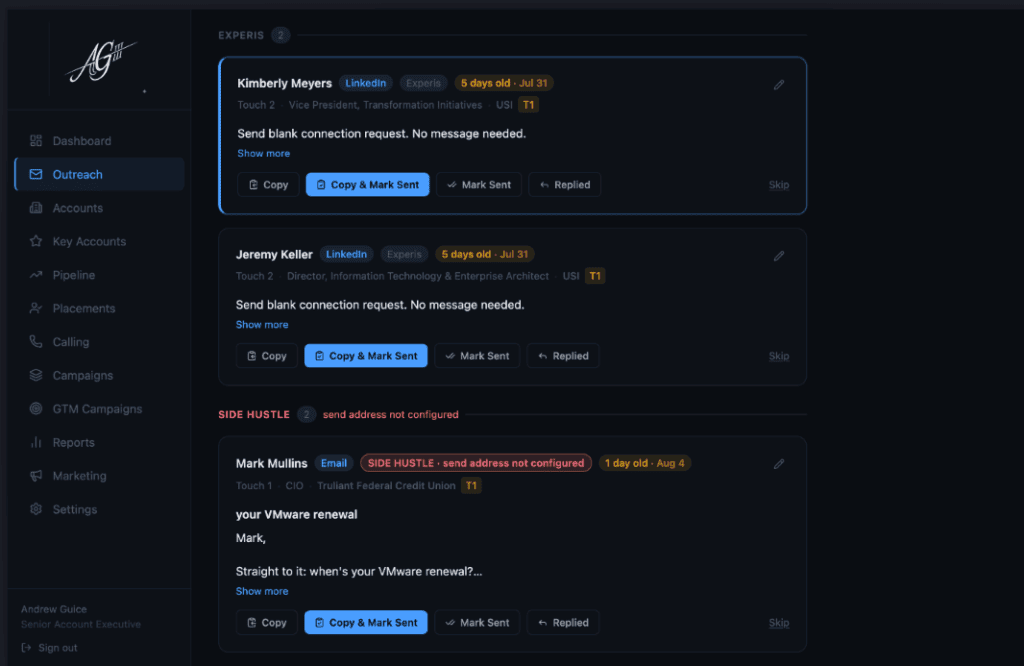
Rather than waiting on a native integration, Guice built a separate, lightweight system designed to complement Bullhorn rather than plug into it directly. He put together a simple outreach dashboard, hosted on Vercel, that organizes his accounts and tracks where each contact stands, from a first LinkedIn touch to a follow up email. It is not trying to be a full CRM. It is closer to a personal control panel that shows him his book: exactly who needs attention and what the next move should be.
The dashboard is connected to Claude, which functions as the engine behind the scenes. Every Friday, the system generates a report that summarizes his week, follow-ups/priorities and what needs to be logged into the ATS. So instead of updating records one contact at a time throughout the week, he handles it in a single organized batch. I built something similar and can relate. What used to take me literally 5+ hours a week now only takes 15-20min.
The Notetaker That Changed His Mind
The second piece of the workflow is a notetaker called Plaud.ai, which records his phone calls and video meetings. Guice was not initially convinced he needed a notetaker at all. He had tried a few before and found them clunky, which made him question whether the extra step was worth it.
But that changed once he actually used one that fit his workflow. He found that the quality of information he captured, particularly around technical details and small but important nuances in a conversation, was noticeably better than what he could catch by hand. The transcripts get run through a custom Claude skill built specifically to process call notes, which then feeds into that same Friday report. The output is a clean, organized summary he can copy directly into Bullhorn instead of retyping everything from memory.
I relate to that skepticism in a sense. I had been recommended notetakers before and my honest reaction was always something like, why would I need this when my memory is good enough. It was not until I actually started using Fireflies that the value clicked. Now I catch myself joking with friends that I do not know how I functioned before I had a notetaker running in the background.
The Payoff: 5 to 6 Hours a Week Back
By his own estimate, this setup saves Guice somewhere between five and six hours a week that used to go into manual note taking, data entry, and hunting down follow up items. That time now goes back into actual business development activity, which is a meaningful shift for anyone carrying a full book of business.
Just as important as the time savings is the quality improvement. He is capturing more of what actually happens in his conversations and losing less information as deals move through the pipeline, which matters a lot in a role where the details from an early conversation often become the reason a deal closes months later.
What Comes Next
The system is still a work in progress. Guice mentioned next steps include connecting Claude to his email so it can flag priority messages automatically, and building out automation for req qualification notes so his recruiters get clean, well organized job requirements and candidate packages without him having to assemble them by hand.
The Bigger Trend
This is where I believe top operators are headed. Andrew is not waiting for his company to roll out a new enterprise tool. He is combining a notetaker, a general purpose AI assistant, and a simple homemade dashboard to solve his own specific bottlenecks, and it is paying off.
A big nod to Andrew for breaking down what he built, how he built it and and exactly why he spent time upskilling. If you are still writing your own call notes, tracking down follow-ups, wondering what daily priorites should be or manually updating your ATS, this is a solid blueprint to start from.