
QE Resume Scanner


Designed for Mid-Senior QA Automation Engineeering Professionals
*Soft Launch Mode*

See Your Resume Through Recruiter Eyes

Upload your resume for AI-powered feedback and a custom report.

  • Get a realistic first-pass resume scan.
  • See how you stack up against other candidates.
  • Designed around real recruiter workflows. Built with Claude and powered by Gemini 3.5.
  • If AI is unavailable, the app switches to a brief recruiter-style review.

Get a wild or unclear result? DM. I’ll jump on a quick call with you.
Why This Tool Is Different

Real Recruiter Behavior

Simulates the 15-second resume scan to show what recruiters notice first. Backed by real QE recruiting experience – not generic resume advice.

Real QE Resume Patterns

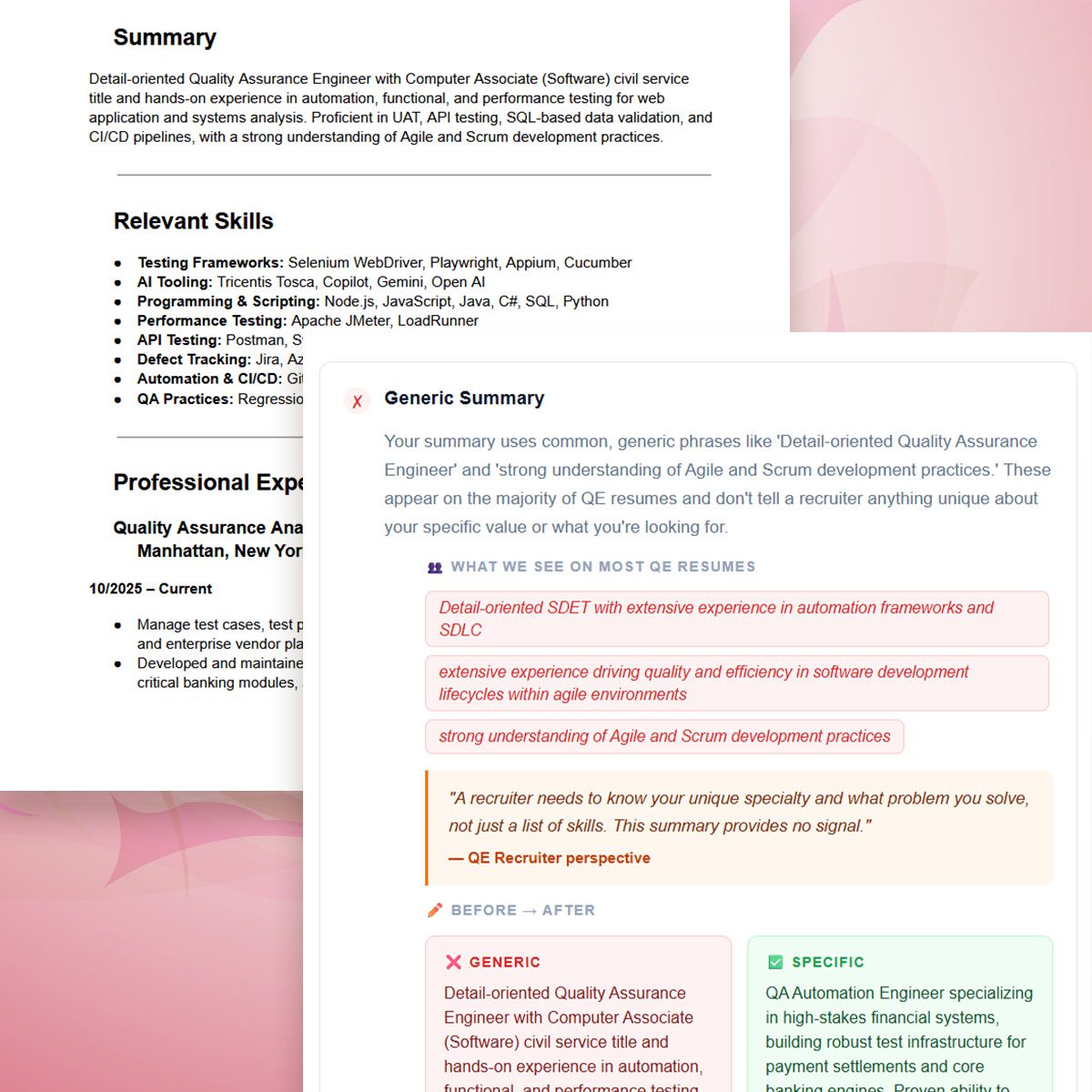
Compares your resume against common QE patterns, repeated phrases, and vague impact claims so you know what to change.

Private by Design

Sends your resume text for AI analysis without storing it on this website. If AI is unavailable, the app falls back to a rules-based system modeled on recruiter screening behavior and current industry resume trends.

Upload or paste your resume

Accepts .pdf, .docx, or .txt — or paste text below. Your resume is sent securely for AI analysis and is not stored by this website.

📄

Drop your file here or click to browse

Supports .pdf · .docx · .txt
or paste your resume text directly
Analyzing your resume...
Reading through a recruiter's lens — usually takes about 2 minutes.
Loading...
out of 100
⏱️
The First 15 Seconds

Your objective and most recent role are the only things a recruiter is guaranteed to read.

👥
How You Look Like Your Peers

These patterns appear across many QE resumes.

🚀
How to Stand Out

Specific changes that separate shortlisted candidates from the pile.

💬
Recruiter Perspective

Things most candidates do not know about how recruiters actually work.

Leave a Reply

Your email address will not be published. Required fields are marked *

Never Miss a New Post

Get the latest posts and tips delivered straight to your inbox.

I don’t spam! Read my privacy policy for more info.

7 Comments

  1. Update 5/29: Tickets are completed. The site is live and fully functional. If you receive an error, send me the error code (or screenshot) and I’ll investigate. Cheers! -JL2

  2. This is great! A couple thoughts:
    1. It took 30s or more to analyze the resume. So many resume analyzers are FAST. I def doubt their accuracy but this is the norm, so even though there was a loading spinner, might make note saying it might take x amount of time.
    2. You mention not to put skills at top and to mention tools in bullets since you actually skip over skills section, so skills section even needed or where put?
    3. This is confusing and maybe add an example. Just put blurb right beneath company name? Never would have thought this was important:
    Explain unknown companies.
    If the company is not a household name, explain what it built and who it served.

    • Ah, you’re the best. I’m running into some issues with different resume formats and lengths, so I’ll need to troubleshoot the parsing logic a bit more.

      Personally, I either move the skills section to the bottom or trim it down entirely. Every recruiter works differently, but if I had a dollar for every time I heard another recruiter say, “If the tool or language isn’t mentioned in the actual experience bullets, I assume they don’t know it well,” I’d be rich. When I review resumes, I usually read the objection/summary quickly and then immediately jump to the most recent role.

      For the company blurbs, I place them right between the title/company/duration and the project details. It’s important to highlight. I’ll bake an example into the code, but for context, I mean something like this:

      Trek Bicycle: Joined Trek’s emerging IoT software initiative to build desktop and mobile UI test automation from the ground up using TypeScript, helping stabilize new eBike diagnostic software and B2C mobile applications.

      Fetch: Brought on during Fetch’s hypergrowth phase to strengthen QA at a leading consumer rewards platform, combining product expertise with automation-focused technical skills to support feature testing and expand automation coverage across mobile and microservices.

  3. I worked with this tool last night for an hour and a half leveraging claude with it. This has been super helpful and I looking forward to how well my new resume performs. One thing I noticed is that in the action verbs/passive verbs section, it kept flip flopping the verbs. First time it said no “Validated” say something else. I changed it then it went back to “say validated”.

  4. Hey Jaclyn, love the idea. I would love if I could click on the different boxes on the report to see more detail about that section. Happy to discuss more on LinkedIn if you’d like

Leave a Reply

Your email address will not be published. Required fields are marked *