

The PromptMates community keeps proving that some of the most useful AI tooling isn’t coming out of big product teams. It’s coming from practitioners who got tired of a specific, everyday problem and decided to fix it themselves.
Three recent shares from the community are great examples of that. One rethinks how sourcing tools score candidates, another automates a weekly reporting grind that used to eat hours of a TA leader’s week, and the third streamlines the entire process of launching a new role from a single Slack command.
Here’s a closer look at each.
1. Rethinking Candidate Scoring: A Two-Pass System That Doesn’t Punish Quiet Profiles
Most sourcing and ATS tools share a quiet flaw: they reward detail, not fit.
A candidate who’s written a thorough, keyword-rich LinkedIn profile will consistently outrank someone who’s actually a stronger match but simply doesn’t self-promote much online. Recruiters see the effect constantly. The same handful of “profile-optimized” names surface at the top of every tool, while genuinely strong, relevant candidates with sparse profiles never make the list.
One PromptMates member decided to solve this directly by building a sourcing tool on Vercel and Supabase, pulling from various APIs and layering in a custom MCP server.
The Core Idea: Score in Two Passes, Not One
Pass One: The traditional approach.
Candidates are scored against the job description and rubric as usual. This naturally favors detailed, keyword-heavy profiles, which is fine for candidates who write a lot, but it’s an unfair filter for people who don’t.
Pass Two: Thinking like a recruiter, not a keyword matcher.
Any candidate scoring below a set threshold (say, 75) automatically gets a second pass. This second pass ignores written detail entirely and instead evaluates the “gold” a recruiter would naturally weigh: relevance of past employers, title and seniority, tenure, location, and other structural signals.
Crucially, this second score can only move a candidate up, never down. It’s designed purely to surface people the first pass buried.
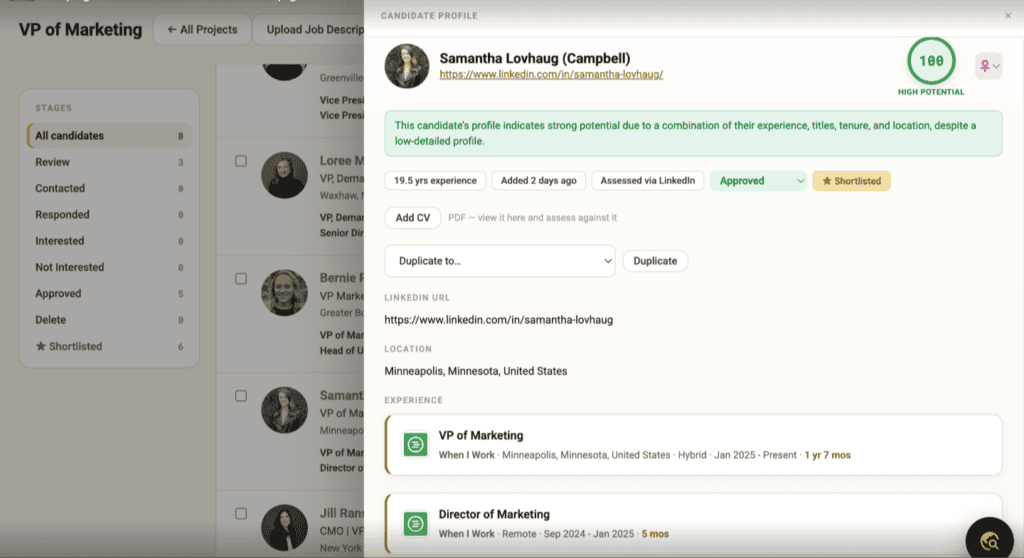
The screenshot shared with the group shows this in action: a VP of Marketing candidate with a low-detail profile still lands a 100 High Potential score, with the tool explicitly noting that the rating comes from a combination of experience, titles, tenure, and location, not from how much the candidate wrote about themselves.
Why It Matters
The outcome is a scoring system that isn’t structurally biased toward people who are good at writing LinkedIn summaries.
In practice, that’s opened up pipelines by 2x to 4x, surfacing strong candidates who were previously invisible to keyword-first tools.
For any team whose current sourcing stack rewards profile polish over actual fit, this two-pass pattern is a genuinely portable idea. The specific weights and thresholds are up to you, but the architecture, score once conventionally, then re-score borderline or low candidates on structural signals, is the transferable part.
2. The Requisition Triage Agent: Turning a Weekly Reporting Grind Into a Monday Morning Brief
The second build, from Stefan, tackles a different but equally familiar pain point: the weekly ritual of wrangling ATS exports and Tableau dashboards into something a TA leadership team can actually act on.
What It Does
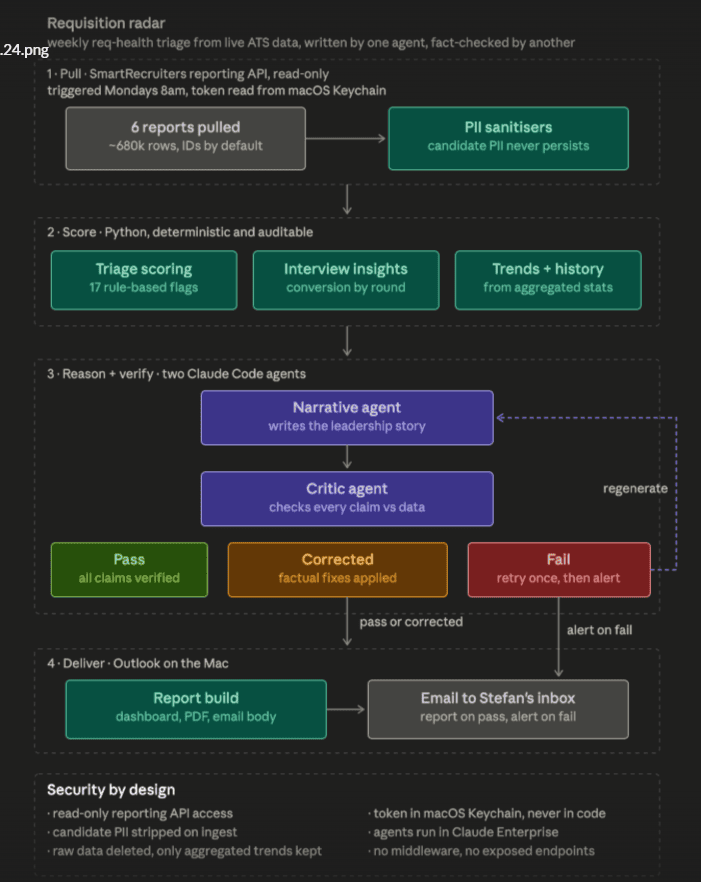
Every Monday, a Claude-powered routine:
- Pulls data from six custom-built ATS reports using SmartRecruiters’ reporting API (roughly 680,000 rows).
- Sanitizes it by stripping candidate PII before anything reaches the AI.
- Scores it using a deterministic, auditable Python layer that applies 17 rule-based triage flags, tracks interview-to-offer conversion by round, and pulls trend history from aggregated statistics.
- Reasons and verifies it using two separate Claude Code agents. One writes the leadership-facing narrative, while the second independently checks every claim against the raw data. If something doesn’t hold up, the report is corrected and regenerated. If it still fails verification, the system alerts rather than sends.
- Delivers a finished HTML dashboard, PDF, and email directly to Stefan’s inbox via Outlook on Mac.
Why It’s High Value
The report doesn’t just summarize activity. It tells the team what to look at first and what’s actually on fire.
Weekly recruiter check-ins have reportedly shifted from “What are you working on?” to “How do we unblock this?” because the diagnostic work is already done before the conversation starts.
It’s also good at catching patterns a human might miss during a quick scan, like a business area or hiring manager where nothing is moving.
Why It’s Low Risk
Given that this runs against live recruiting data, the security design is worth calling out.
- No candidate PII ever reaches the AI. The ATS reports intentionally exclude it, and a whitelist-based sanitizer removes anything outside the approved field list.
- IDs are pseudonymized on ingest, so nothing traces back to a real person.
- Credentials never touch the code. The SmartRecruiters API token lives only in the Mac Keychain.
- Everything runs inside an Enterprise Claude environment with no middleware or exposed endpoints.
- Raw exports delete themselves after each run. Only a small aggregated summary is retained for trend analysis, a lesson learned after an early run generated 1.2 GB of raw CSVs.
How It Came Together
Stefan planned the workflow with Claude Fable before building it out with Opus, his first attempt at an agentic workflow of this kind.
The trickiest part wasn’t the pipeline itself. It was fine-tuning the SLA logic and teaching the workflow to understand business-specific nuance.
Interview-stage data remains a rough edge because some operational limitations inside SmartRecruiters make bottleneck analysis harder than it should be.
As Stefan points out, the tool doesn’t have full business context. A role could be on hold, a job spec could have changed, or a search could have been recalibrated, none of which it knows.
What it does provide is a sharp, data-grounded starting point for the conversation, not a replacement for it.
3. Starting the Hiring Process With a Single Slack Command
The third build, from Emily, focuses on a pain point almost every recruiting team recognizes: opening a new role.
Creating a requisition often means bouncing between multiple systems just to get the hiring process moving. Opening the role in the ATS, creating Slack channels, inviting stakeholders, sharing hiring resources, and making sure everyone knows the next steps may only take a few minutes each, but together they create unnecessary friction every single time a position opens.
Emily’s solution was to bring the entire kickoff process into Slack.
What It Does
Using a custom /new-role Slack command, hiring teams complete a short form with key information like the job title, department, hiring manager, location, employment type, and whether the role should connect to an existing Ashby opening.
Once submitted, the workflow can:
- Create the job and opening in Ashby
- Create the hiring Slack channel using a standard naming convention
- Invite the appropriate stakeholders
- Pin hiring manager resources
- Share AI-powered job description and interview planning tools
- Generate a prefilled prompt using the role details
What previously required jumping between several tools and roughly 30 minutes of manual setup can now be launched from a single Slack command.
How It Was Built
The workflow uses Slack’s Bolt framework with Node.js to power the command and form, Replit to host the application, Ashby’s API to create jobs and openings, and Claude to help write code, troubleshoot issues, and validate API calls.
Rather than introducing another dashboard or piece of software for hiring managers to learn, Emily built the automation inside the tool her team already uses every day.
Why It Matters
The value isn’t just saving time. It’s making every new search start the same way.
By standardizing the kickoff process, hiring managers receive the resources they need immediately, repetitive setup work disappears, and recruiting can spend less time coordinating logistics and more time partnering with the business.
Emily also shares a much deeper walkthrough of the workflow, the lessons learned while building it, and her approach to operational AI in her Talent Talk newsletter.
The Common Thread
While each build tackles a different recruiting problem, they all solve the same underlying issue: unnecessary friction.
Whether it’s a sourcing tool that rewards profile polish over actual fit, a reporting process that’s too noisy to surface what actually needs attention, or repetitive operational work that slows down hiring before a search even begins, each builder started with a real workflow problem instead of asking, “How can I use AI?”
In all three cases, the solution wasn’t a bigger model. It was a smarter process around the model: a second scoring pass with different rules, a second AI agent whose job is to verify the first, or a workflow that automates repetitive setup work inside the tools recruiters already use.
It’s a good reminder that some of the most effective AI engineering happening today isn’t about building the most sophisticated model. It’s about designing thoughtful workflows, adding the right guardrails, and solving problems people encounter every day.
Thank You
A huge thank you to Jason for sharing the two-pass candidate scoring system, Stefan for sharing the Requisition Triage Agent, and Emily for sharing her Slack-based hiring kickoff workflow.
Each of you took the time to document your builds thoughtfully, making it possible for others in the community to learn from your work and apply similar ideas to their own challenges.
If Emily’s workflow sparked your interest, I also recommend checking out her Talent Talk newsletter, where she shares a deeper walkthrough of the build, the lessons she learned, and her broader approach to AI-enabled recruiting operations.
Thanks as well to the wider PromptMates community for continuing to be a place where this kind of practical, well-documented experimentation happens in the open.