

I’ve been running my own version of this setup for a while now, using Fireflies to capture meetings and Cowork to turn the mess of transcripts, calendar invites, and follow-ups into something actually usable. It’s saved me hours every week. So when I saw a post in PromptMates breaking down a similiar system, I knew I had to add it to the blog.
What I love about Emily’s approach is that it’s not one big, intimidating automation. It’s four small “skills” that build on each other: crawl, walk, run, and then a sub-agent that ties it together. You can start with the simplest one on a Monday afternoon and have the whole system running within a couple of weeks.
Here they are, in plain markdown, straight from the PromptMates writeup. Copy one, swap in your own tools, and you’ve got your own version.
CRAWL: Meetings + Fireflies
The simplest starting point. This one just runs once a week — every Monday, it looks at your real meetings and adds your notetaker to them automatically, so you never have to remember to do it yourself.
---
name: monday-fireflies-invites
description: Every Monday, invite the notetaker to my real meetings for the week.
---
## Steps
1. Pull my calendar from now through Friday.
2. Add the notetaker only when it's a real meeting:
   - there's another actual person on it
   - it isn't a solo focus block
   - it isn't a company-wide all-hands
   - it isn't a casual coffee or lunch
3. Update just that meeting, not the whole series.
4. Report what it added and what it skipped.
5. Never send email. Only touch the calendar.
The filtering logic here is the whole trick — it’s specific enough to skip the noise (all-hands, coffee chats, focus blocks) without you having to babysit it.
WALK: Meeting Review
Once the notetaker is reliably showing up, the next step is having something review what it captured. At 5pm each day, this skill sweeps through your meetings, pulls out action items, and leaves a triage dashboard ready for the next morning.
---
name: daily-meeting-review
description: End of day, review today's meetings, sweep my action items, and open the triage dashboard.
---
## Steps
1. Pull today's meetings from my calendar.
2. Match each to its notetaker transcript or notes.
3. Summarize every meeting and tag its coverage.
4. Sweep my action items into a staging file.
5. This run is unattended, so don't ask me anything.
6. Open the dashboard so it's ready when I am.
Very interesting: Notice the instruction that it’s unattended and shouldn’t ask questions — that’s a small detail, but it’s what makes the automation actually hands-off instead of generating a pile of Slack pings you have to answer before it can finish.
RUN: Morning Briefing
This is the payoff. Every morning at 6am, this skill pulls together news, weather, email, team channels, and your calendar, decides what actually matters, and sends you a two-line summary — so by the time you’re at your desk, the priority-setting is already done.
---
name: morning-briefing
description: Every day at 6am, build my morning briefing and send me a two-line summary.
---
## Steps
1. Pull AI news, world news, and my local weather.
2. Pull my email: needs-action, awaiting, saved.
3. Pull my team channels and DMs.
4. Pull my week's calendar and today's pipeline.
5. Decide the priorities and write the dashboard.
6. Send me a two-line message so I know it's ready.

## Speed rules
Retry once, then skip. Partial is fine, just flag it.
No single source is allowed to hang the run.
The “speed rules” at the bottom are worth stealing on their own. Any multi-source automation like this will eventually hit a slow or broken source — building in “retry once, then skip, partial is fine” from day one keeps the whole thing from grinding to a halt over one bad API call.
SUB-AGENT: The Gmail Fetch Agent
The last piece is a sub-agent that lives inside the bigger “Chief of Staff” system: its whole job is fetching what’s changed in Gmail since the last run, using a watermark (a saved timestamp) instead of re-reading the entire inbox every time.
---
name: comms-fetch
description: Pull only what changed in Gmail since the last run, and return a compact delta.
---
## What I do
I never read the whole inbox. Every run I read a watermark
(when I last ran) and only look at what is newer.

## Steps
1. Read the last run's timestamp from state.
2. Ask Gmail for threads updated after that timestamp.
3. Strip signatures, quoted replies, and footers.
4. Keep only what might need me: from, subject, one-line snippet.
5. Return a compact JSON delta.
6. Save a new watermark = now.
The watermark pattern is the real takeaway here, and it applies well beyond email — any time you’re pulling from a source that grows over time, tracking “what changed since I last checked” instead of re-processing everything is what keeps the automation fast and cheap to run.
Why This Is Worth Copying
None of these skills are complicated on their own. What makes the system work is the order: get the data flowing first (Fireflies), teach something to make sense of it daily (the review), then let it proactively tell you what matters (the briefing) with a lean fetch agent underneath keeping the whole thing efficient. Jason tried it out and here is a sample of the output:
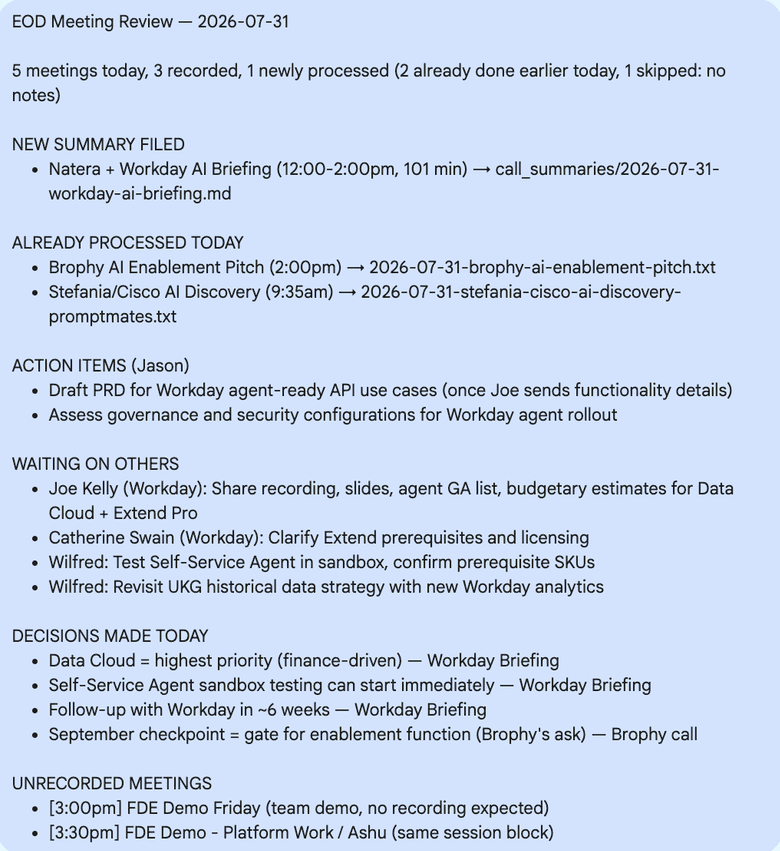
If you’re a talent leader (or really anyone managing a packed calendar and a noisy inbox), start with the Monday invite skill, get comfortable with it, and build up from there. You can use this for your team, and customize however you want for your operations.
Thanks PromptMates community for putting these together and sharing them in plain, copyable form.